Let’s get this out of the way, I co-founded The Journeyman and I also run a fire company. A wildland EMS company to be more specific. I use this The Journeyman App because It truly helps me run my business, not because it’s my creation.
Here’s what I rely on, broken down by what actually matters:
Roster Management
Let’s be honest, when your company gets to a certain size, it’s hard to keep track of people. “Who is this guy again?”, “Is she a medic or an EMT?”, “Are they red-carded for the year?”. At times it is just nice to see a picture of the person. This alone will spark my memory on a lot of important things regarding this individual.
When someone applies, I see their certs and expiration dates and know they are ready to deploy. Personally, I only add people to our roster after we’ve interviewed them and feel good about that person working for us. In the event of me needing to, everything’s uploaded by the firefighter, and I can access their certifications at any time, message them, send them push notifications, assign them to an incident, issue them gear and much more.
Hiring & Job Posting
We and many other companies push out openings. Firefighters apply through the app. We filter by reviewing their certs or experience on the firefighters profile. When we like someone, we add them to the roster. Since our realm of wildfire is basically “hire-when-needed” and we cannot predict the need for the upcoming fire season we do not physically and legally hire until the time of deployment. This leads to ambiguity and confusion from firefighters wondering where they stand with us. Now with TJM, they can physically see they are on our roster. They now feel included because they are in our company group chats have access to important company documents and more, making them feel integrated into the team. I have found it incredibly healpful to view a firefighters profile and learn more about them and their work history prior to interviewing them.
Incident Tracking
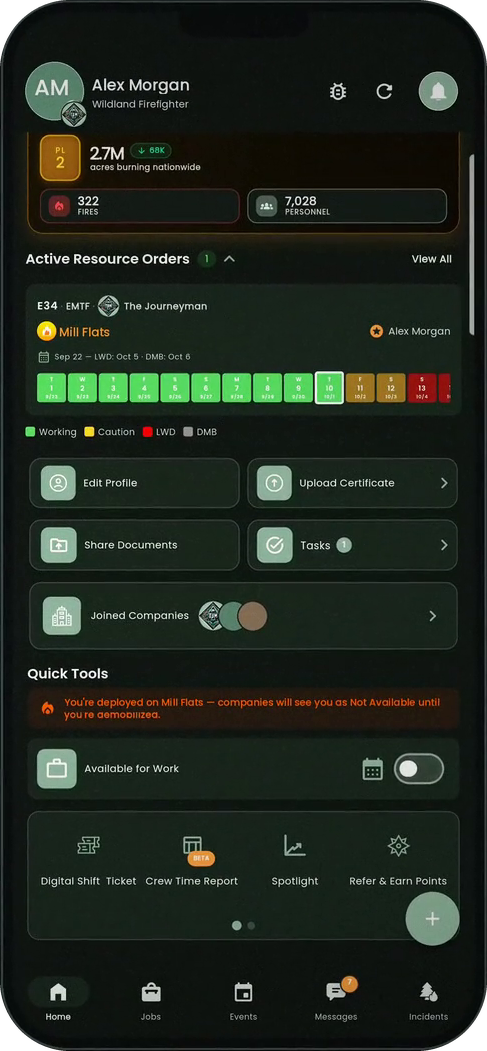
Once you get a resource order and deploy your team, you now assign them to that incident on the app. When we assign a crew to this incident, we upload their RO or EERA, agreement, and any other documents that they have instant access to. Once assigned, this triggers the app to begin tracking who was where and when. When you have many crews across the country I have found this beyond helpful to keep track of everyone. Multiple times it's been crucial to look back at this information. This will help you establish trends over the years of what incidents you worked at, when, for how long, how much money you made and more.
Equipment Tracking
Every time we issue gear — radios, shelters, medical bags, etc — it gets logged in the app. If something disappears or comes back damaged, we know who had it. We used to lose thousands every season on unreturned equipment. Not anymore.
Financial Overview
This has become mission-critical. I can open the dashboard and see how much we’ve earned per incident — and how much has actually been paid out and what is still owed. I know what’s pending from the government, what’s cleared, and where we stand on cash flow. It gives me control over decisions in a way I didn’t have before. TJM breaks it down even further by telling me how much money my business has made in each state, making reporting earnings to states a breeze. Furthermore, by using our incident management feature, I can track how much each one of my assets made, by state. If you choose to be meticulous with adding your expenses associated with the specific resource (fuel, repairs, storage fees, etc) you will have an even clearer of how each asset/resource within your company performs.
Shift Tickets
Our app has digital shift tickets which grabs the data from your uploaded equipment enabling most all fields on your shift tickets to be auto-filled out by your crews. No more mistakes and no more excuses on why they haven't been done, filling them out now takes less than a minute and eliminates the frustration of hand writing the same repetitive information day after day.
Once completed, the shift ticket can be signed by the appropriate person on the IMT and CANNOT be modified once signed. From there, your employee simply emails the ticket to finance and to yourself if you choose. Now all of your shift tickets live in once place and can be accessed at any time by you or the employee. Now, if finance calls inquiring about a specific shift ticket, you know right where to look. No more scrambling through the truck trying to find an old shift ticket book. I know for certain this has saved me money by getting not paid when finance has a discrepancy with a day that you worked.
Resource Tracking & Mapping
I can see who’s available, who’s deployed, and who’s timing out and when with our resource glidepath.. Everything’s status-based, live, and clear. It’s especially useful mid-season when fatigue kicks in and availability is always changing. With our live map feature, those who have agreed to share their location are easily visible on a map. On multiple occasions this last season, it helped us fill ROs simply by knowing who was the closest of our employees to the incident. This has been incredibly handy when the government calls with an unreasonably short timeline to respond to the incident. Our app pulls information directly from inciweb so you are able to get all published information about the fire you’re sending crews to.
These incidents you’ve been tracking live in the app in an “active” and “completed” menus. So when you ask yourself things like “Who is working at that one fire in Washington” or “Where is the OF-286 for the XYZ fire from last month?”. Now, you know right where to find that information.
Compliance & Certs
Have you ever had an employee not be able to find a certification or needed to access one of their certs but cant immediately get ahold of them. When this happens to me, I know that I can just go right to their profile and access and download their certification. As a medical company, the MEDLs often request that we send over their certifications and red cards prior to their arrival. It makes us look very dialed in to them when we are able to easily and quickly send over what they want.
TJM tracks expiration dates automatically. I and the employee get alerts before anything goes out of date. That one feature alone has saved us from being turned away from incidents by accidentally showing up with an out of date cert. Yes, ultimately this is the employees responsibility, but if they’re not on top of it, it can make you look stupid and cost you tons of money simply because someone let a cert lapse.
Spotlight
The Spotlight is the ultimate compilation of everything I wanted out of this app. This is the clean and organized data delivered to you in an easy to read report about how your business perfomred over the past year. It tells you how many incidents you went to, how many different ROs you fulfilled, how many total days on fire your company worked, how many days per state, how much money you made per state, how many ROs per state, how many shift tickets your employees filled out. The equipment report gives you a breakdown of how many days, ROs, states and money each of your assets made. This helps me make essential strategic business decisions. Lastly, the Spotlight delivers a “Roster Report”. This delivers me information on each of my employees such as how many fires they went to, what fires they went to, how many days they worked and how much I paid them in gross wages. From there I am able to easily determine how much money they made in each state, which has saved me more than once when a state calls and is wondering how much money said employee made in that specific state.
Bottom Line
I built The Journeyman because I needed it. And now I use it because it works.
If it ever stops serving our company in the field, I’ll be the first to call it out. But until then, it’s what keeps our operation clean, ready, and growing.